
News:
Problems registering, no confirmation email - see http://wiki.scribus.net/canvas/Forums_Registration
Recent posts
#11
Scripts and Plugins / Re: Scripting engine in versio...
Last post by a.l.e - July 17, 2025, 03:03:03 PMThat Scripter is in Scribus, but I doubt that it works.
And you need to recompile Scribus with that Scripter activated (instead of the "normal" one) to use it.
It has never been used and it's basically abandoned.
I have plans for creating a new engine, with a more structured API, but it's not really a high priority right now.
(I guess that I need to sit down with Jean, and find out why it does not build...)
And you need to recompile Scribus with that Scripter activated (instead of the "normal" one) to use it.
It has never been used and it's basically abandoned.
I have plans for creating a new engine, with a more structured API, but it's not really a high priority right now.
(I guess that I need to sit down with Jean, and find out why it does not build...)
#12
Scripts and Plugins / Scripting engine in version 1....
Last post by hjh - July 17, 2025, 12:32:32 PMHi
Then entry page about scripting in the wiki
https://wiki.scribus.net/canvas/Category:Scripts
mentions a new scripting engine in a note.
"The next steps will be to get the script engine to work (should already be ok)"
Is a new scripting engine working in 1.6.4? And what is new about it?
There is a documentation for Scribus version 1.5 about a scripter 2
https://scribus-scripter.readthedocs.io/en/latest/#
Does this documentation apply to Scribus 1.6.4?
--Hannes
P.S. If I evaluate the following
in the console window I get an error message.
Then entry page about scripting in the wiki
https://wiki.scribus.net/canvas/Category:Scripts
mentions a new scripting engine in a note.
"The next steps will be to get the script engine to work (should already be ok)"
Is a new scripting engine working in 1.6.4? And what is new about it?
There is a documentation for Scribus version 1.5 about a scripter 2
https://scribus-scripter.readthedocs.io/en/latest/#
Does this documentation apply to Scribus 1.6.4?
--Hannes
P.S. If I evaluate the following
Code Select
import scribus
document = Scripter.activeDocument
margins = document.margins
margins.top
in the console window I get an error message.
#13
General Discussion / Re: June 2025
Last post by a.l.e - July 17, 2025, 08:10:11 AMIt already happened in July:
Open tickets with pending patches:
Tickets with "simple" tasks:
Scripts to be created
- add setImagePreviewResolution() and getImagePreviewResolution() to the Scripter (which allowed the creation of a Script to change the preview resolution of all images in a document
- Apply style shortcuts based on the action search tool (shift-esc)
Open tickets with pending patches:
- apply masterpage: change the range fields to one field where user defined pages can be entered (like 1-4,7,9)
- Preflight verifier: check for trailing spaces
- Automatic detection of page size format
- Scripter: GetItem(name) should look inside of groups
- Export to PDF/X-1a:2003
- Freehand tool: always smooth the linex
- Picture frame padding
- Export selection to SVG
- Change from Conical gradient to mesh Gradient generate new color names
- Limit the width of the tooltips
- 'snap to guides' should be enabled by default
- disabling hyphenation for word by inserting softhyphen before it
- it should not be possible to insert multiple soft hyphens one after the other
- Search & replace all text frames
- WIP PATCH: Import pages with linked text frames breaks the links
- Warn when a hyphenation dictionary is missing
- Image compression in PDF
- Support automatic line spacing in gettext plugins
- Scribuses working in parallel overwrite each others temp files
- ctrl: move image orthogonally inside of the image frame
- fill a frame with the image
Tickets with "simple" tasks:
- duplicate on layer
- A way to manage stylesheets when inserting a page from another document
- Implicit right tab on right hand margin
- svg plug-in doesn't import text as (editable) text
- Expand item to the next guide
- Add an option to export a PDF file containing all data relevant for production
- shift-drag to create items fitting multiple areas
- PDF export directory presets
- Select all frames in a chain
- button to convert column and rows guides to "real" guides
- selecting multiple items at once should happen in ltr/rtl order
- Add an option to list used fonts first (also see the related tickets)
- Use Same folder for other missing images" isnt used for other frames using same image
- Scripter: moveObject() only moves one of several selected objects
- more units to edit an image's size
- font family/style separation in quick character palette
- when creating an image frame a click should create it at the image size
Scripts to be created
#14
General Discussion / June 2025
Last post by a.l.e - July 17, 2025, 08:06:38 AMJune was a low activity month.
But we were not inactive, and a few cleaning up tasks have been performed (of course, several bugs have also been fixed!):
But we were not inactive, and a few cleaning up tasks have been performed (of course, several bugs have also been fixed!):
- Improve the naming of the properties in the .sla file format
- Merge of the "Infrastructure" issue tracker into the main one (and resolving or closing most of the tickets that were in there)
- Resolving, triaging and/or closing some of the oldest tickets that were still open (we're talking about twenty years old tickets...).
#15
Scripts and Plugins / Re: new document with size A3 ...
Last post by hjh - July 16, 2025, 08:45:58 PMThank you prcek and Ale.
This solves the issue.
I have to pay attention that the paper size and the units for the document match
--Hannes
This solves the issue.
I have to pay attention that the paper size and the units for the document match
Code Select
scribus.newDocument(scribus.PAPER_A3_MM, (10, 10, 10, 10), scribus.LANDSCAPE, 1, scribus.UNIT_MILLIMETERS, scribus.NOFACINGPAGES, scribus.FIRSTPAGERIGHT, 1)
--Hannes
#16
Scripts and Plugins / Re: new document with size A3 ...
Last post by a.l.e - July 16, 2025, 08:38:59 PMbtw, for examples, you can have a look at the scripts in
https://github.com/aoloe/scribus-script-repository
but i guess you already found that out, when i gave you the link to my version of the boilerplate...
https://github.com/aoloe/scribus-script-repository
but i guess you already found that out, when i gave you the link to my version of the boilerplate...
#17
Scripts and Plugins / Re: Setting the border of a te...
Last post by a.l.e - July 16, 2025, 08:28:26 PMAs far as I can tell, Scribus does not have the concept of "no border".
If you set the line to 0, then you will get an "hairline" border (you can try it in the console: you will see that, then, the properties palette shows the value as "hairline").
If you look at how the text frames are created by default, you will see that the color of the border is set to "transparent".
This seems the way Scribus does "no borders"... (somehow, I always did this way, but never had any thoughts about it...)
If you set the line to 0, then you will get an "hairline" border (you can try it in the console: you will see that, then, the properties palette shows the value as "hairline").
If you look at how the text frames are created by default, you will see that the color of the border is set to "transparent".
This seems the way Scribus does "no borders"... (somehow, I always did this way, but never had any thoughts about it...)
#18
Scripts and Plugins / Re: new document with size A3 ...
Last post by a.l.e - July 16, 2025, 08:20:20 PMIndeed, typing help(scribus) in "Script > Show Console" gives you all the commands.
You could also write a Script that you run from inside of Scribus that gets the result of help(scribus) and writes it into a text file.
You can also press F1, open the Scribus help and go to the "For Developers > Scripter API" section and browse it.
Or search for "paper_a5_mm" in there.
Finally, you can go to https://impagina.org/scribus-scripter-api/page/#constants for a description of the API that has a better search function and is a bit better organized (and, sadly, really needs an update! but i'm working on it)
Almost overkill : - )
You could also write a Script that you run from inside of Scribus that gets the result of help(scribus) and writes it into a text file.
You can also press F1, open the Scribus help and go to the "For Developers > Scripter API" section and browse it.
Or search for "paper_a5_mm" in there.
Finally, you can go to https://impagina.org/scribus-scripter-api/page/#constants for a description of the API that has a better search function and is a bit better organized (and, sadly, really needs an update! but i'm working on it)
Almost overkill : - )
#19
Beginner Talk / Key F3 - show styles dialog - ...
Last post by hjh - July 16, 2025, 08:16:01 PMHi
If I hit the F3 button nothing happens. According to the 'Edit' menu the 'Styles...' dialog should show up. The place where styles are defined
If I right click on a text frame the 'content properties' box also has the F3 shortcut.
Is this a bug?
Regards
Hannes
If I hit the F3 button nothing happens. According to the 'Edit' menu the 'Styles...' dialog should show up. The place where styles are defined
If I right click on a text frame the 'content properties' box also has the F3 shortcut.
Is this a bug?
Regards
Hannes
#20
Beginner Talk / Re: How Add Inteface Themes
Last post by joseb - July 16, 2025, 05:15:30 PM3_ DIFFERENCES BETWEEN EDITABLE AND DELAYABLE FIELDS
Another suggestion would be to unify the colour of the editable fields. In Scribus with Fusiontheme, numeric fields and textual fields (drop-down) have a different background colour. See screenshot below:
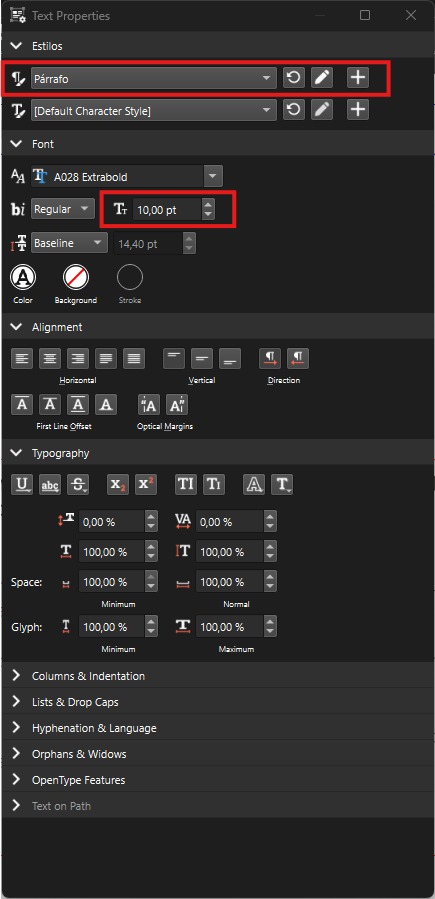
Also, in QSS it's practically impossible to match the two colour tones in those editable fields, because you start having problems with the 'arrows'.
I know it will be difficult, but I think these editable fields should have the same background colour. And following the same idea, match those background/activation/hover colours in dropdowns, lists, icons, etc.
Another suggestion would be to unify the colour of the editable fields. In Scribus with Fusiontheme, numeric fields and textual fields (drop-down) have a different background colour. See screenshot below:
Also, in QSS it's practically impossible to match the two colour tones in those editable fields, because you start having problems with the 'arrows'.
I know it will be difficult, but I think these editable fields should have the same background colour. And following the same idea, match those background/activation/hover colours in dropdowns, lists, icons, etc.